


Creature Foliage System
ARK: Survival Ascended


A system that allows foliage to grow on the game's creatures over time (foliage growth is sped up for the video)
-
The goal was to create a tool that Level Designers could use to draw foliage on the game's dinosaurs, in the same way that they would draw foliage on a game level.
-
On the gameplay side, the foliage had to be interactive, it had to grow over time and players had to be able to harvest it.
-
My task was to create the tools that would turn "level foliage" into "dinosaur foliage", as well as the gameplay of foliage growth and harvesting.
 |  |  |  |
|---|---|---|---|
 |  |  |
The Oasisaur, a dinosaur that has foliage growing on its back.
Players can "harvest" the creature's foliage by interacting with the dinosaur's inventory.
When players place a structure on top of the dinosaur, the foliage gets dynamically destroyed around the structure placement area.

Creating the Foliage Tools
-
To create the foliage tools, I collaborated with Level Designers, Tech Artists, and Designers.
-
One of our top priorities was to make the process fast. After a level designer created a new layout, it had to take very little time to see the layout in the game.
-
In the end, introducing a new foliage preset into the game took less than ten minutes using the tools we created.
-
The process to create new foliage preset ended up as follows:
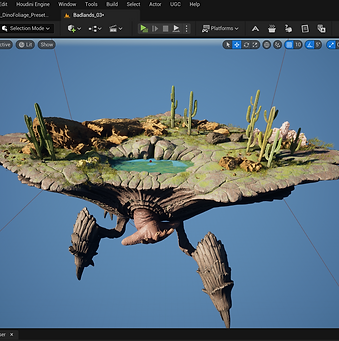
Step 1: Level Designer creates a foliage level.

Step 2: A tool created by a tech artist, takes the level info and creates a data table that contains a list of foliage meshes and their transforms.
MY WORK

Step 3: A preset generator (created by me) grabs the information from the data table.
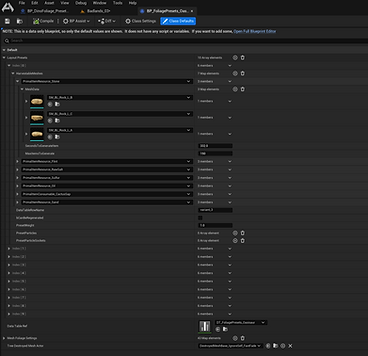
Step 4: The preset generator creates a foliage preset blueprint, which can be used in-game, by gameplay logic that I also worked on.
Foliage gameplay
-
The foliage gameplay had to allow for foliage growth over time, and for harvesting by players.
-
Foliage also reacts to players placing structures on the creature. Foliage auto-harvests when a structure is placed in that area.
-
The foliage is spawned using instanced static meshes, for better performance.
-
The foliage doesn't require almost any replication. Client and server generate foliage independently, and communicate every now and then to make sure they are in sync.
Blueprint logic example, showing the function that decides which foliage instances needs to be shown or hidden.
-
One of the main concerns when developing the system was scalability: we wanted to have potentially thousands of foliage instances on the game's instances.
-
It was decided early on that we would use Static Mesh Instances for the foliage, to optimize performance.
-
Even using Static Mesh Instances, the harvesting mechanic required hiding hundreds of instances at once, and spawning destructible meshes in their place. For that, we created a frame staggering system, where the spawning of the destructible meshes is spread out through several frames.
Preset replication and foliage growth
-
My goal when creating the system was to have minimal replication.
-
To achieve that, all of the information for the foliage presets is generated before the game starts and stored in a data blueprint. With this setup, we only need to replicate a preset number, that is then used by both client and server to read from the preset data blueprint.
-
For the foliage growth mechanic, the client and the server calculate the growth rate of the foliage independently. Whenever a gameplay event happens (BeginPlay, the player harvests some foliage, the player builds a struct...), the client and server sync up and correct any desyncs that might have happened after the last sync.
Foliage Harvesting
-
One of the biggest replication challenges was related to Foliage Harvesting. Players can harvest a dinosaur's foliage by removing items from the dinosaur's inventory. For example, if a player removes 67% of wood from the dinosaur's inventory, 67% of the wood foliage on the dinosaur's back gets destroyed in game.
-
We wanted all clients to see the same foliage getting destroyed, without having to replicate every instance of the foliage that got destroyed.
-
To accomplish this, we used a replicated "harvesting index", that works as follows:
-
Each foliage entity has a number assigned to them, which is static and is chosen before the game starts, and stored in the preset data blueprint. The number is unique and it goes from 0 to # of foliage instances.
-
When a player removes 67% of foliage of a specific type (for example, wood), we calculate the harvesting index like so:
-
Harvesting Index = # of wood foliage instances * 0.67
-
-
This harvesting index is then replicated by the server to all clients.
-
The clients destroy all wood instances which have an index lower than the harvesting index.
-
Example of a blueprint function that calculates the harvesting index.